Active Directory User, Group and File Access Management
Case Study 02
I built and managed a small Active Directory environment for the fictional Yarra River Services organisation.
The exercise covered organisational units, user accounts, security groups, password and account administration,
PowerShell verification, shared-folder access, and employee onboarding and offboarding scenarios.
Support Environment
- Windows Server 2025 lab
- Active Directory Domain Services
- Active Directory Users and Computers
- Windows PowerShell
- Windows file sharing
- Security groups and access permissions
- Fictional Yarra River Services environment
1. Building the Active Directory Structure
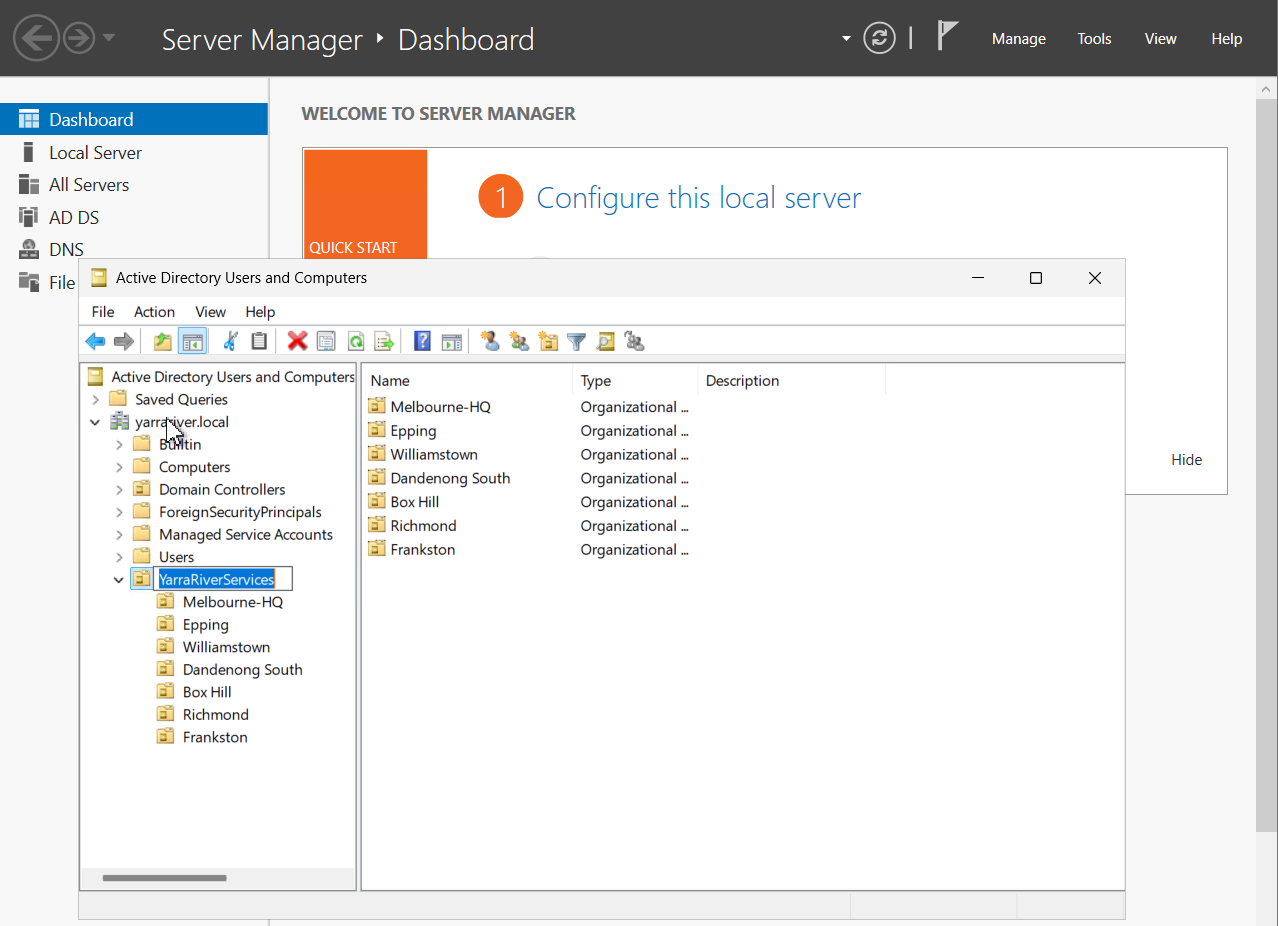
I started by creating a top-level organisational unit called
YarraRiverServices.
Inside it, I created separate OUs for Melbourne-HQ, Epping, Williamstown,
Dandenong South, Box Hill, Richmond and Frankston.
The purpose of the structure was to organise directory objects by location
and provide a logical structure that could later be used for policy management.
Key concept
An OU is mainly used to organise directory objects and provide a structure
for administration and policy. It is not the same thing as a security group.
2. Creating Security Groups
I created four Global Security groups for the lab.
GRP-HR
GRP-Helpdesk
GRP-Operations
The security groups provide a scalable way to manage access.
Instead of assigning folder permissions separately to every employee,
access can be granted to a group and users can then be added or removed
from that group as required.
3. Managing a Finance User
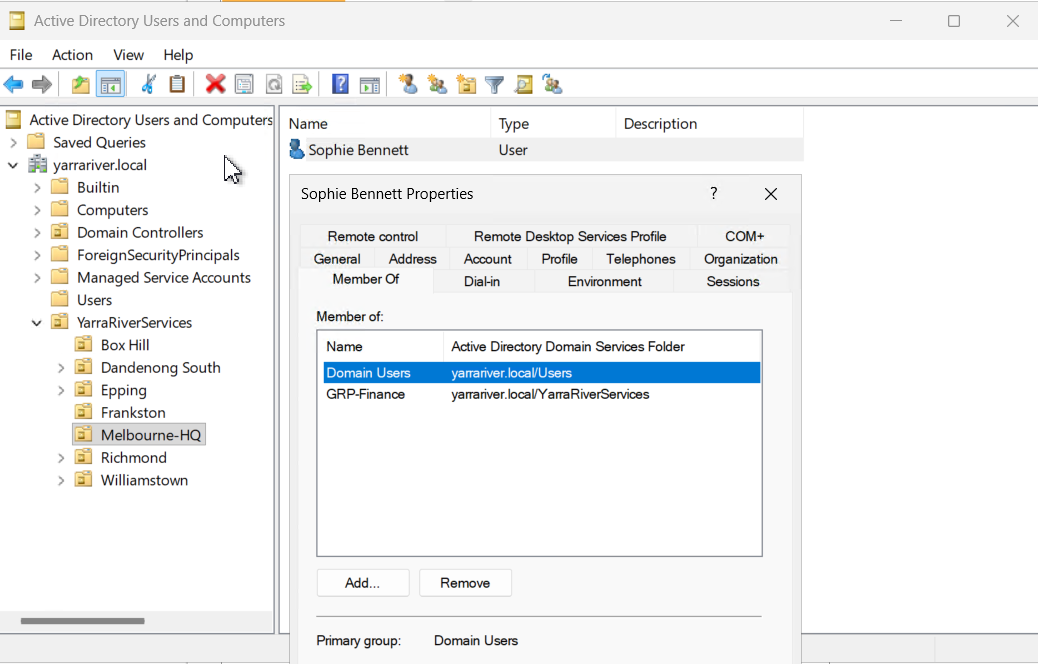
I created the fictional user Sophie Bennett inside the
Melbourne-HQ OU.
I added Sophie to GRP-Finance and verified the membership
from her Active Directory properties.
Account Administration
I also practised common Level 1 account-management actions on Sophie’s account.
- Reset the user’s password
- Required password change at next logon
- Disabled the account
- Confirmed the disabled account state
- Re-enabled the account
These are common service desk tasks when responding to password,
account-state and sign-in requests.
4. Verifying Active Directory with PowerShell
After completing the GUI administration, I used PowerShell to query
Active Directory and verify the results.
Get-ADUser -Filter * | Select-Object Name,SamAccountName
Get-ADUser -Identity "sophie.bennett"
Get-ADGroupMember -Identity "GRP-Finance"
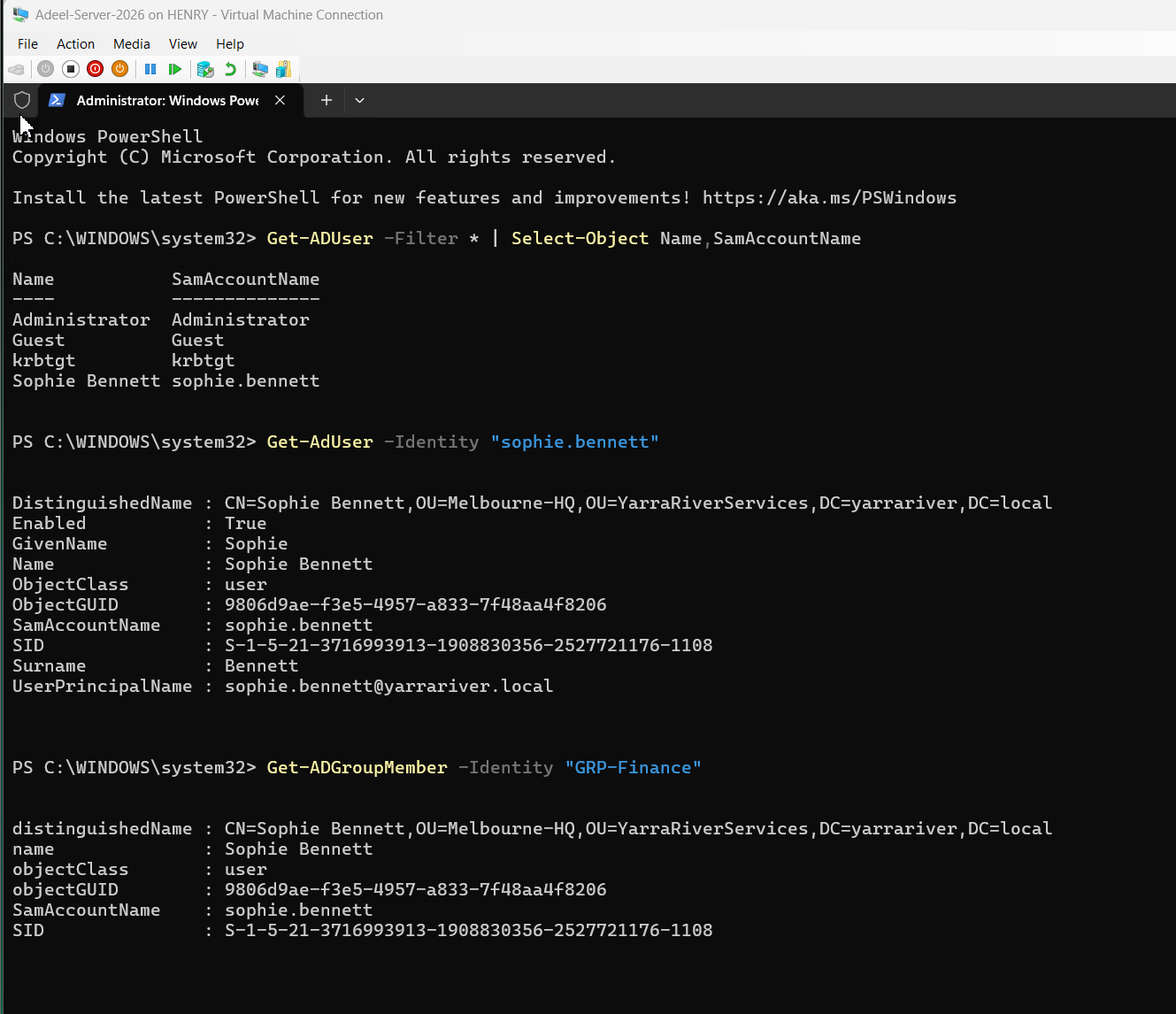
The output confirmed that Sophie existed in Active Directory, her account was enabled,
she was located under the Melbourne-HQ OU, and she belonged to GRP-Finance.
5. Configuring FinanceShare Access
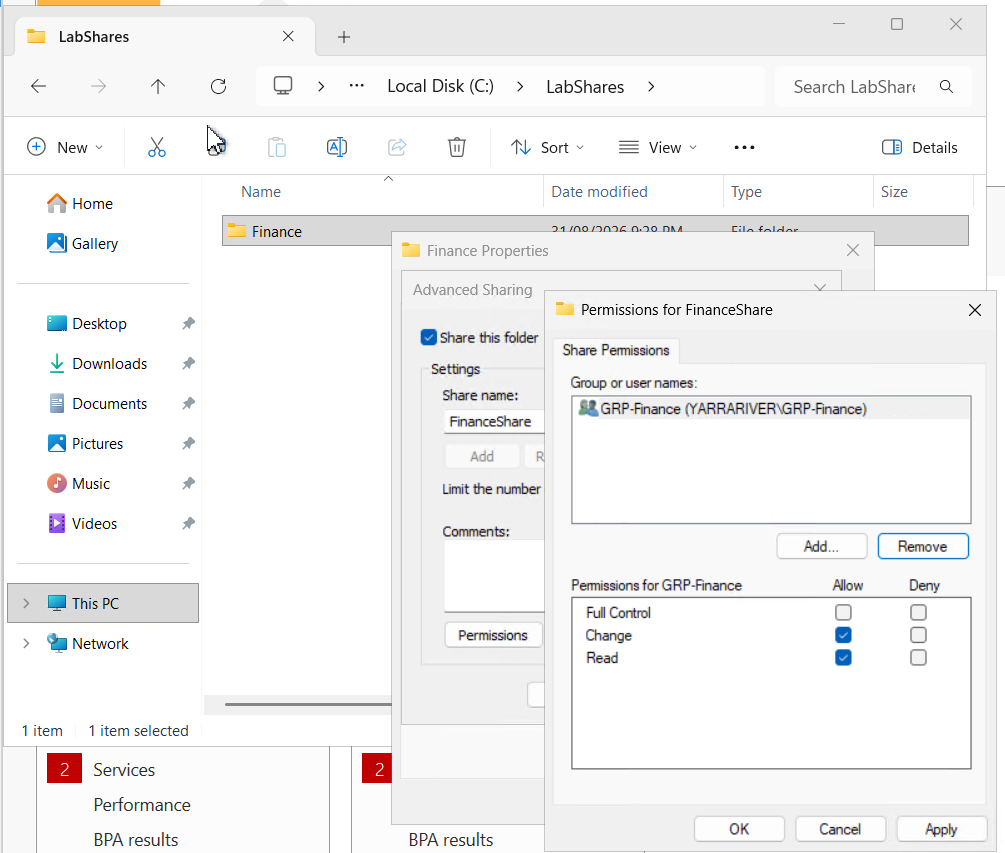
I created a shared Finance folder on the lab server at
C:\LabShares\Finance and shared it as
FinanceShare.
Rather than assigning access directly to individual users,
I configured the share to use GRP-Finance.
The group received Read and Change
share permissions without unnecessary Full Control access.
Access model
User → Security Group → Resource
This allows access to be managed by changing group membership
instead of repeatedly changing folder permissions.
6. Share Permissions vs NTFS Permissions
Windows shared folders can involve two separate permission layers.
Share Permissions
These control access through the network share.
In this lab, GRP-Finance was given Read and Change access to FinanceShare.
NTFS Permissions
These are the file-system permissions shown under a folder’s
Security tab.
When a user accesses a shared folder over the network, both permission
layers can affect what the user is ultimately able to do.
Memory rule
Share permissions control the network door.
NTFS permissions control the files and folders behind it.
7. Access Request Ticket
Scenario
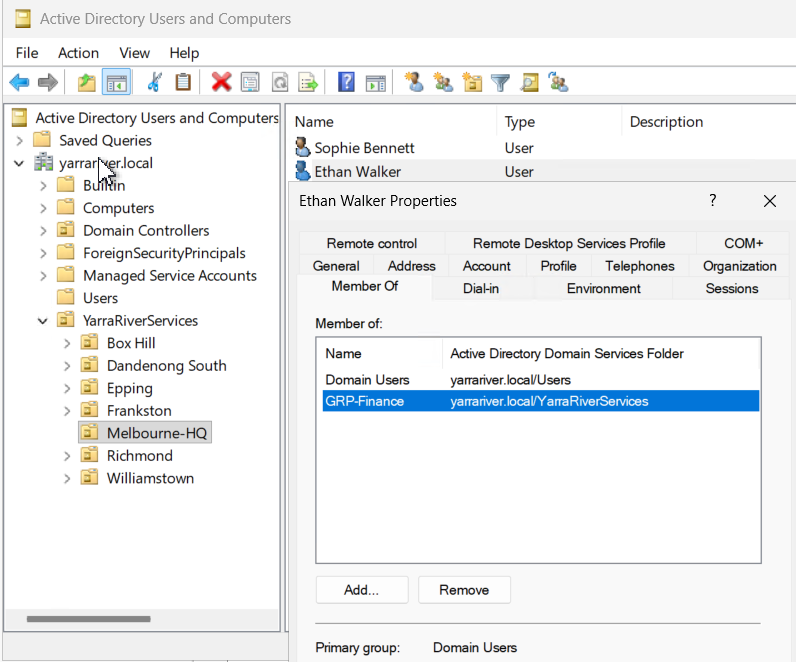
Ethan Walker moved into a Finance role and required access to FinanceShare.
The fictional scenario assumed that manager approval had already been provided.
I treated the request as an access-management task rather than assigning
Ethan permissions directly to the Finance folder.
I added Ethan to GRP-Finance and then verified his membership.
Result
Ethan’s Finance group membership was confirmed.
The existing group-based access model was used instead of creating a separate permission entry for the individual user.
Least-Privilege Reasoning
The change used the existing Finance security group and did not grant Ethan
additional administrative permissions or unrelated access.
This keeps access easier to review, maintain and remove later.
8. Employee Offboarding Ticket
Scenario
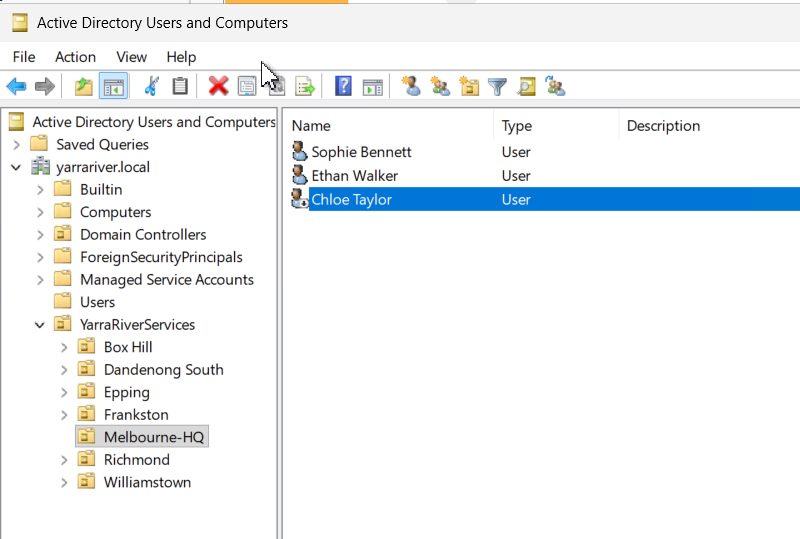
Chloe Taylor was leaving the organisation.
The fictional scenario assumed that an approved HR offboarding request
had been received.
I first verified that Chloe was the correct Active Directory user and
confirmed her HR group membership.
I then disabled her Active Directory account rather than deleting it.
Result
The account was disabled while the Active Directory object remained available
for the remainder of the offboarding process.
Disabling the AD account does not automatically complete every possible
offboarding task.
Other systems such as Microsoft 365, email, devices, VPN access and business
applications may require separate actions or escalation according to company procedure.
What I Learned
This lab helped connect several Active Directory concepts that initially
looked like separate tasks.
The final model was straightforward.
OU
Where an account is organised.
Security Group
Which access role or membership the account belongs to.
Permissions
What that group can actually access or modify.
Skills Demonstrated
ADUC
Organizational Units
Security Groups
User Administration
Password Reset
Account Disable
PowerShell
File Sharing
Access Requests
Least Privilege
Offboarding
Support Summary
This exercise demonstrated a basic Level 1 Active Directory workflow from
directory organisation through to account administration and resource access.
I created an OU structure, managed users and security groups, verified account
information with PowerShell, configured group-based shared-folder access,
processed an approved access request and completed an account-disable action
for an offboarding scenario.
Lab Disclosure
This case study was completed in a controlled hands-on IT support lab.
Yarra River Services and all employee names used in the scenarios are fictional.
The screenshots show actual configuration and commands performed in my lab environment.
This was not production administration.